WHO THIS IS FOR

Community Education Coordinator
You need to stop acting like a paperwork processor and start spending more time building programs. You want registration, confirmations, reminders, and enrollment tracking to run without manual follow-up.
Facilities Director
You need community use requests, school events, and athletics visible in one calendar so spaces stay protected, conflicts are prevented, and facility access is easier to manage.
CFO / Finance Leader
You need a clear view of community-generated revenue, not fragmented numbers reconciled across registrations, invoices, and facility use. You also need better visibility into program profitability and fee recovery.
District Administrator
You need a community access model that improves service for families without adding more operational friction for your team. You want one platform that connects scheduling, enrollment, and payment in a way that scales.
THE OPERATIONAL REALITY
Community demand is real. The operational model behind it is usually broken.
Your community wants access to your buildings, but most districts still manage that demand through scattered processes that make scheduling harder, registration slower, and revenue less visible.
61.6% of school districts have joint use agreements, but most recoup little of the costs. The result is lost revenue, frustrated families, and coordinators doing data entry instead of building programs.
I am still running registration through forms, emails, and paper checks.
That creates friction for families and manual work for staff before a program even begins.
I do not have one shared calendar that protects school use and prevents conflicts.
Without one district-wide calendar, rooms get double-booked, priorities are unclear, and staff end up checking availability by phone or email.
I cannot clearly see revenue, costs, and program performance.
Finance needs one view of revenue, but most districts are reconciling data across separate tools and manual processes instead.
WHAT THE SUITE DELIVERS
One complete revenue cycle.
A single system, built for K-12, connects who is using your spaces and when with how families find, register, and pay, closing the loop from scheduling to enrollment to revenue.
Less friction for families
Families browse, register, and pay in one public portal instead of navigating disconnected forms, checks, and callbacks.
Less admin work for staff
Automated confirmations, reminders, waitlists, approvals, and calendar sync reduce the manual work that usually falls on coordinators.
Better control over facilities use
Districts can prioritize school use, avoid conflicts, and understand which spaces are used, when, and by whom.
Clearer revenue visibility
Scheduling, enrollment, invoicing, and payments are connected so finance leaders can see community-generated income more clearly.
THE PLATFORM
The Bundle for Community Access
Two connected products. One community access system.
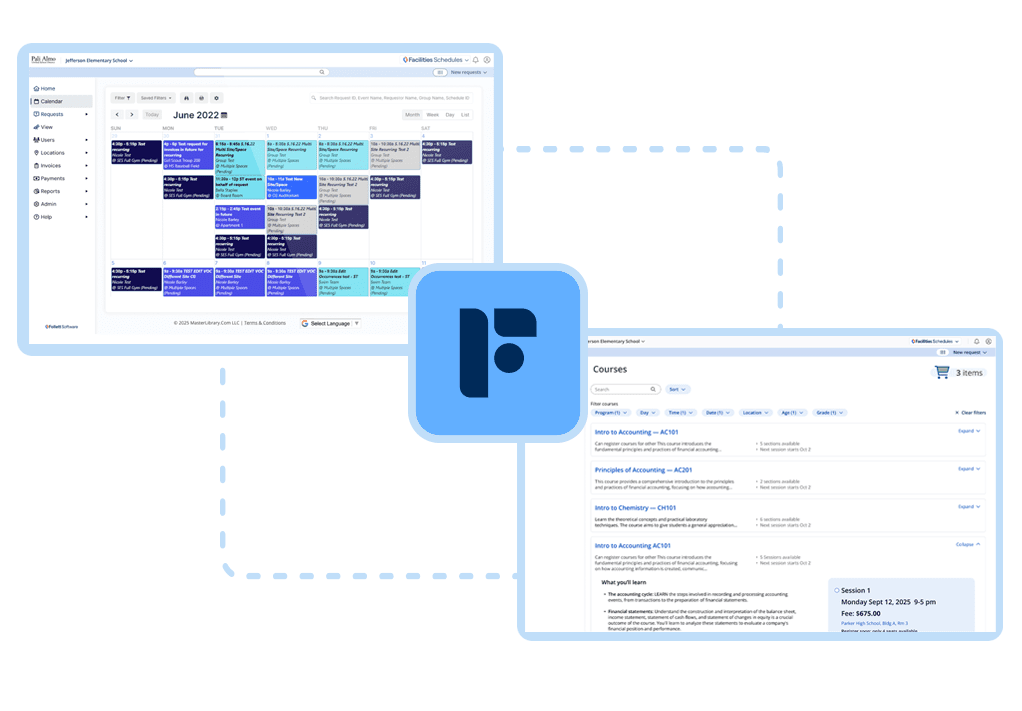
The Community Access bundle combines Facilities Schedules and Event Registration into one connected platform. Schedules manages requests, approvals, conflict detection, and invoicing. Event Registration adds the public-facing portal where families browse programs, register, and pay online.

Facilities Schedules
Scheduling that powers community revenue
See every community request in one calendar so you can prioritize school use, avoid conflicts, and price access confidently.
- Central calendar for all school and community events
- Simple requests and approvals for internal staff and outside groups
- Rules and priorities that protect instructional time and athletics
- Clear visibility into which spaces are used, when, and by whom
Event Registration
Online registration that turns interest into revenue
Families and community members discover programs, register, and pay in one online portal connected to the facility schedule, so every enrollment is confirmed, paid, and accounted for.
- Public program catalog where families can browse and filter offerings
- Fast online registration and payment with no paper forms or checks
- Family accounts so one household manages all children’s programs
- Automatic waitlists, confirmations, reminders, and updates
- Real-time capacity tracking to avoid over- or under-filled programs
Why this combination is unbeatable.
WHY THE PLATFORM MATTERS
Schedules and Event Registration are natively integrated, built on the same platform, not stitched together by an API.
- Live calendar sync means available facility times auto-populate from the live Schedules calendar when coordinators create programs.
- Registration drives scheduling, so a parent registration can automatically confirm the facility reservation without manual transfer between systems.
- Payments close the loop through online payment processing, automated invoicing, and one view of community-generated revenue.
- Families get one discovery experience instead of multiple systems and disconnected steps.

WHAT HAPPENS NEXT
A working demo built around your district.
In a short working demo, Follett can show the full community experience from program discovery to enrollment to facility confirmation, and what it looks like for your team on the back end.
Review your current community access workflow
Look at how requests, registrations, approvals, and payments are handled today and where friction is slowing things down.
See the end-to-end family and staff experience
Walk through how families browse, register, and pay, and how your team sees enrollment, scheduling, and revenue in one workflow.
Identify the right next expansion path
See how Community Access can expand into Work Orders, Drawings, and broader facilities management over time.
See how this would work in your district.
In a short working demo, Follett can show the full community experience from program discovery to enrollment to facility confirmation.
Schedule a Facilities Suite DemoFREQUENTLY ASKED QUESTIONS
What Districts Ask Before They Buy
-
The Community Access bundle combines Schedules and Event Registration into one connected platform. Schedules manages facility use requests, approvals, conflict detection, insurance tracking, and invoicing, while Event Registration adds the public portal for browsing, registration, and payment.
-
If your scheduling tool does not natively share data with your registration system, you are managing two separate platforms with manual reconciliation in between. That is where double-bookings happen, revenue gets missed, and staff time gets consumed.
-
Families visit your district’s public portal, browse programs in one place, create a family account, select a program, add siblings if needed, and pay online. They receive automated confirmations and reminders without staff doing anything manually.
-
The coordinator stops being a scheduling administrator and starts being a program builder. Instead of manually entering registrations, chasing insurance certificates, reconciling payments, and fielding availability questions, they can spend more time on partnerships and program development.
-
Yes. Schedules includes athletic integrations so practice schedules, game schedules, and facility reservations for athletics live in the same calendar as community education and external rentals.