Emergency Response Plans – Facilities Drawings User Resources
Facilities Suite
Facilities Drawings User Resources for Emergency Plans
Facilities Drawings
Use these Facilities Drawings free resources to develop Emergency Response building floor plans and campus maps that meet all 2024 NYSED data requirements. While Facilities Drawings can be used to develop floor plans with the appropriate asset locations, separate PDF editing software (e.g., Adobe Acrobat®) is also needed for both floor plans and area maps.
Emergency Response Floor Plans & Area Maps Webcast
Facilities Drawings Use Case
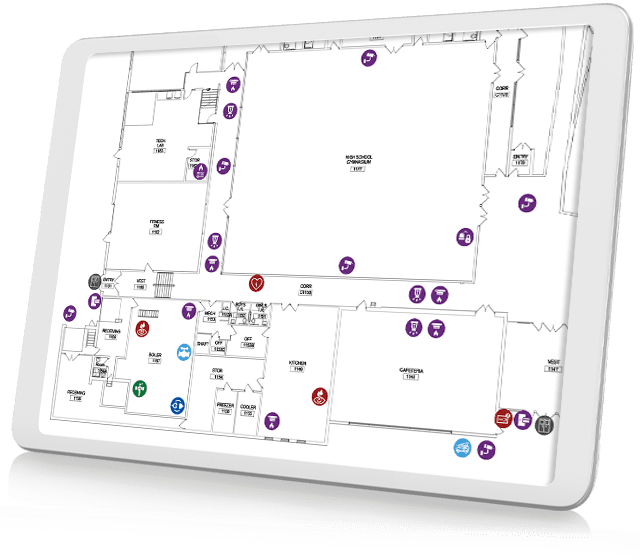
Learn how Facilities Drawings interactive floor-plan software can simplify the creation of emergency use floor plans and area maps that meet updated 2024 NYSED requirements. In this recording of an August 16, 2024 40-minute webinar, Professional Services Manager Dylan Mercier demonstrates how floor plans can be easily stamped with different asset symbols to accurately show the locations of these critical items. The use of Asset Symbol Keys and other available free user resources are also discussed.


Area Map Title Block
Facilities Drawings
This T-1 CAD-based Title Block PNG can be customized for each area map with building name and street address using the Type tool in most PDF editing software applications.

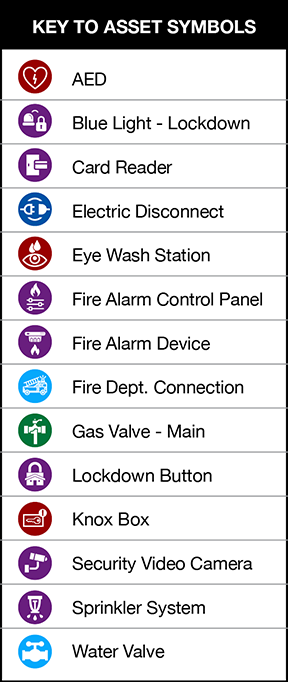
Facilities Drawings Assets Symbols Key
Facilities Drawings
This PNG file can be placed in Facilities Drawings-generated Emergency Response floor plans using PDF editing software.
ML Drawings
North compass point
This PNG image file can be placed on floor plans and area map using PDF editing software. Rotate the image so North faces the correct direction on the plan or map.

Emergency Response Plans Tip Sheet
ML Drawings
Get a jump start on meeting the new 2024 NYSED Emergency Response Plan requirements with this Facilities Drawings Tip Sheet. Learn how to:
- Stamp required asset types on floor plans with Facilities Drawings. Then use a PDF editor to drop in the Symbols Key.
- Use the Facilities Drawings integrated PDF markup tools to develop area maps. Then use a PDF editor to drop in the T1 Site Map frame and North compass point, if needed.
The Tip Sheet PDF also includes links to helpful detailed support articles as well as to the new Emergency Response Plans user resource webpage.

Helpful Facilities Drawings Emergency Use articles
Facilities Drawings Use Case

Emergency Use Floor Plans
Building-Level Emergency Plans
This article discusses the 2024 NYSED Building-Level Emergency Plans floor plan requirements and how Facilities Drawings can be used to meet most all of them. Leveraging your Architect’s original CAD files and customizing Facilities Drawings floor plans using filterable views are also discussed.

Emergency Use Area Maps
Building-Level Emergency Plans
2024 NYSED Building-Level Emergency Plans area map requirements are presented as well as how Facilities Drawings can be used to develop accurate school district building area maps. Leveraging GoogleMap base image files and using the software’s integrated markup capabilities on your base Area Map are also discussed.